Most entry-level job seekers fail the interview because they can’t explain fundamental testing concepts.
Manual testing interviews would also demand a good grasp of the basic and advanced concepts. Focus on such aspects as the design of test cases, defect management, and regression testing, and underline your capability to perform test plans and prioritise the tasks effectively.
InterSmart EduTech has been training students on how to ace interviews for years. We are fully aware of the issues that are raised and how to respond. This article will provide you with the best and most valuable manual testing interview questions in 2025 with simple and practical answers.
Before we get to the questions, it is important to first clarify that Many people believe automation led to the extinction of manual testing.
However, as per the latest PractiTest State of Testing statistics, nearly half of the organisations still use manual testing in their entire software testing process. The reason? Manual testing brings issues to the surface that the automated process misses. Problems related to usability. Issues with the user experience. Those rare situations that nobody could foresee.
Human judgment and intuition are necessary for manual testing. A script cannot do that. This is why there is still a great need for manual testers, particularly for those who have a solid foundation and know the basics very well.
Software testing is the process of evaluating a software system to verify that it meets business requirements. It measures the overall quality of the system in terms of attributes such as accuracy, clarity, usability, and performance.
Testing is important because it finds bugs and defects before the software reaches real users. A single critical bug in production can cost a company millions and destroy customer trust. Testing provides stakeholders with the assurance that the product works as intended.
You can refer to the ISTBQ Glossary to be familiar with testing terms.
Verification and validation are two critical quality assurance processes that are often confused. Here is the clear difference:
| Aspect | Verification | Validation |
| Key question | Are we building the product right? | Are we building the right product? |
| Focus | Checks whether development is proceeding according to specifications | Verifies that the final product meets user requirements |
| Type | Static (without code execution) | Dynamic (with code execution) |
| Activities | Reviews, walkthroughs, inspections | Functional tests, user testing |
| Timing | During development | After development |
| Example | Verify that the button is blue as specified | Verify that the button performs the function that users need |
SDLC is the structured process for software development. The key stages include: Requirements analysis, during which we get to know what is to be built. Design, in which the architecture is planned. The actual development occurs in the implementation or coding. By testing, we ensure quality. Deployment, in which the software is made available to the users. And Maintenance, and we update and fix bugs. Testing is not a single stage, but it occurs throughout the SDLC. The sooner the bug is identified, the cheaper it will be to squash.
STLC is the testing process parallel to the SDLC. All these phases are: Requirement Analysis, where we get to know what we will be testing. Test Planning, in which the test strategy is defined. Test Case Development, in which we write elaborate test cases. Setting up the test Environment, wherein we set up the test infrastructure. Test Execution: Here, we do the testing and create bugs. Test Closure, where we create an analysis of metrics and record lessons learnt. STLC makes sure that testing is done in a systematic manner and not in an ad hoc manner.
Structured Approach:
Test Planning: Test goals and scope. Identify particular features or functionality to test.
Test Case Design: Construct rich test cases that test different cases, edge cases and expected outcomes.
Test Environment Preparation: Install the hardware, software and tools required. The major pitfall is that it is likely that the test environment resembles the production environment.
Test Implementation: Run test cases manually and write the discrepancy between the actual and expected results.
Defect Logging: In case of other occurrences of other defects, record them in detail to be used in analysis and solution.
The API testing is done to ensure that an API behaves as expected. This involves verification of the API to ensure that it is responsive to different requests, data verification, error handling, and proper integration with other systems.
To perform the manual API testing, we usually work with tools such as Postman or Insomnia, where we can send the requests to the API and test the replies.
| Aspect | Alpha Testing | Beta Testing |
| Carried out by | Internal developers/testers | Selected group of external users |
| Time | Before Beta Testing | Following Alpha Testing |
| Environment | Controlled test environment | Real-world user environment |
| Purpose | Identify bugs early | Identify user experience issues and additional bugs |
| Example | E-commerce app: Test basic features like adding a product to the shopping cart | Evaluate performance across devices and network conditions |
A testbed is an experimental environment that contains the hardware, software and tools required to run the testing, to ensure consistency in the test runs.
Example: An example of a testbed founded on the cloud would include cloud servers, databases and integration testing tools, including Jenkins. Manual testers use testbeds to perform tests (e.g., regression testing or performance testing) and recreate specific user environments (browsers, operating systems and network conditions).
With the introduction of cloud computing and DevOps, the testbeds have now been designed to appear similar to the production environment, and the emphasis has now shifted to scaling and performance.
AWS Testing Environment Guide can help you understand the principles.
| Aspect | Manual Testing | Automated Testing |
| Execution | Human testers execute test cases step-by-step | Scripts execute predefined tests |
| Ideal for | UI/UX Testing, Exploratory Testing, Ad-hoc Testing | Repetitive tasks, regression testing |
| Human judgment | Required for subjective evaluation | Limited to predefined scenarios |
| Speed | Slower for repetitive tasks | Faster for large test suites |
| Cost | Low initial investment | Higher setup effort, but cost-effective in the long run |
| Flexibility | Very flexible for changes | Requires script updates when changes occur |
Functional testing verifies what the system is doing. It compares features with specifications. As an example: Is the login functioning? Is it possible to place the products into the shopping cart? Non-functional testing is used to verify the way the system does it. It has performance, usability, security and reliability tests. As an example, does the page take less than 2 seconds to load? Is it capable of accommodating 10,000 simultaneous users? Both are important. A functionality is a perfect app, but when it loads slowly, users will not utilise it.
Black box testing tests without knowledge of the internal code structure. I only test inputs and outputs. This is what most manual testers do. White box testing tests with full knowledge of the code. It is usually done by developers and includes code coverage and path testing. Grey box testing is a combination. I have partial knowledge of the internal structure, which helps design better test cases. For example, if I know that a feature uses a database query, I can perform SQL injection tests.
Regression testing verifies that new code changes haven’t broken existing functionalities. If a developer fixes a bug in feature A, we need to test that features B, C, and D still work. It’s one of the most time-consuming types of testing because you have to rerun many existing test cases. That’s why regression testing is often a candidate for automation. But initial regression testing is usually done manually to understand which tests are most important.
Smoke testing is a superficial test after a new build. It checks the most critical functionalities. If these don’t work, the build is rejected and goes back to development. It’s like, ‘Can we even open the app? Can we log in? “Sanity testing is more specific. After a bug fix, sanity testing only tests that particular feature and related functionalities. It’s more thorough than smoke testing but more narrowly focused than full regression testing. Both are quick and informal and usually undocumented.
A bug is a deviation from the expected behaviour. It’s when the actual output doesn’t match the expected output. Bugs can have different severity levels. Critical bugs prevent the use of the app, like a crash. Severe bugs affect the main functionalities. Medium bugs affect less important features. Minor bugs are cosmetic in nature, such as incorrect colours or typos. As a tester, it’s important to clearly document bugs with steps to reproduce, screenshots, and logs so that developers can fix them efficiently.”
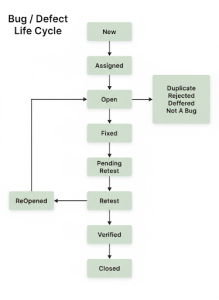
The Bug Life Cycle shows the different stages of a bug. New: The Tester finds and logs the bug.
Assigned: The Bug is assigned to a developer.
Open: The Developer starts working on fixing it.
Fixed: The Developer has fixed the bug.
Retest: The Tester tests again.
Closed: The Tester confirms the bug is fixed.
There are also: Rejected if it’s not a real bug. Deferred, if the bug will be fixed later. Duplicate, if the bug has already been logged. Not a Bug, if the behaviour is actually correct. The life cycle ensures transparency and tracking.
At the extremes of the input ranges, there are the Boundary Value Analysis tests. As an example, when a field can be represented with values in the range of 1 to 100, I would test 0 (less than the boundary), 1 (less than the lower boundary), 50 (less than the middle), 100 (more than the upper boundary), and 101 (more than the upper boundary). Boundaries are infamous for bugs as a result of off-by-one errors in design. The method is highly effective, as a variety of possible bugs are covered using a few test cases.
In Equivalence Partitioning, input data is grouped together so that all values in a group are supposed to be handled in a similar manner. As an example, in an age field, Group 1 would be 0-17 (minor), Group 2 would be 18-65 (adult), and Group 3 would be 66+ (senior). The test is done on one value of each group rather than testing all possible ages. This significantly decreases the test cases without coverage reduction. Equivalence Partitioning should be used together with Boundary Value Analysis.
Exploratory Testing involves learning, designing and testing simultaneously by testers. It has little or no prior planning. I do not rely on the test cases that are already set; I just browse with the application in the same way that the user would. I attempt a variety of directions, unforeseen combinations and boundary cases. It comes in handy, especially in locating bugs that no one could have expected. Exploratory Testing is not a replacement for structured testing, but an addition. It involves experience and sound testing instincts.
UAT is the final testing phase where actual end-users or stakeholders test the system. They verify whether it meets their business requirements and functions in real-world scenarios.
UAT happens after all other tests (unit, integration, system) are completed. It is critical because technical teams sometimes build features that are technically correct but don’t meet the actual user needs. UAT catches such problems. Only after successful UAT does the software go into production.
Collaborate with Stakeholders: Engage with Product Owners and Developers to clarify ambiguities
Analyse Existing Documentation: Review available documents (user stories, wireframes)
Develop Assumptions: Make reasonable assumptions based on product understanding
Use Exploratory Testing: Discover potential issues through flexible testing approaches
Iterative Feedback: Maintain regular feedback loops for requirements refinement
“With tight deadlines, use risk-based testing:
Step 1: Identify High-Risk Areas – Features that are most likely to fail or have a major impact
Step 2: Prioritise Core Functionalities and critical user paths
Step 3: Use session-based testing for quick coverage of essential areas
Step 4: Combine manual testing with automated regression tests
Insight: Incorporating automated tests alongside manual efforts can speed up the process without compromising quality.”
Test Coverage: Ensure that all critical functionalities have been tested.
Defect Detection Rate: Measure how many defects were found during testing, especially high-severity defects.
Quality of the final product: When the product performs as expected with minimal post-release issues.
Modern Metrics: In Agile environments, tracking velocity and cycle time provides teams with real-time metrics on testing effectiveness.
InterSmart EduTech Preparation for the interview is a part of our training:
Mock Interviews: Practise interview scenarios and receive personalised feedback.
Laboratory Projects: Hands-on experience in the use of real applications.
Portfolio Building: Real-life test cases and bug reports that you can present to employers.
Soft Skills Training: Communication, problem-solving, and professional demeanour.
Experience with tools: Practical knowledge of Jira, TestRail, Postman, and other industry-standard tools.
Our graduates report that real interviews were often easier than our mock interviews because we thoroughly prepared them for all aspects.
InterSmart EduTech has a thorough training programme with hands-on projects, mock interviews, and placement support. Start your testing career with the right training. Contact InterSmart EduTech now.